Run a flat org without losing the picture

Thor replaces the middle layer that used to translate your goals into execution and report back, so you can stay hands off and still know exactly what's happening.

You're in 8 meetings a day and still missing what matters

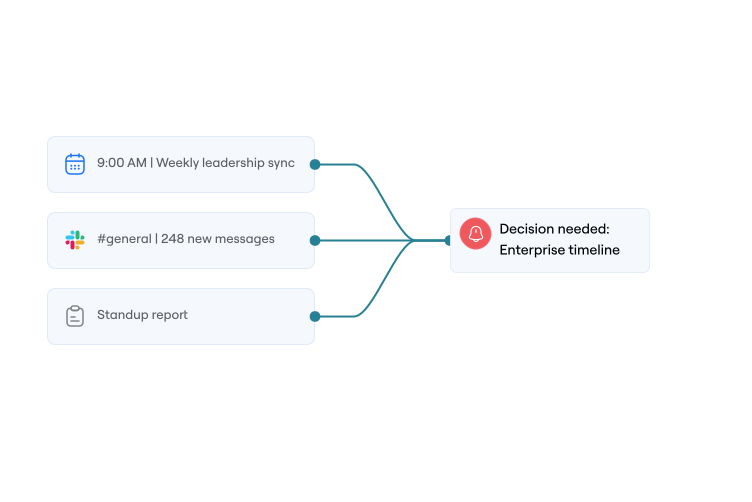
Slack notifications are noise. Standups and status reports are stale the moment they're written. The work that matters most gets buried under everything that doesn't.

Stay informed without becoming the middle layer.

Ambient, not another inbox

Thor works in the background and only surfaces what needs you, delivered where you already work.

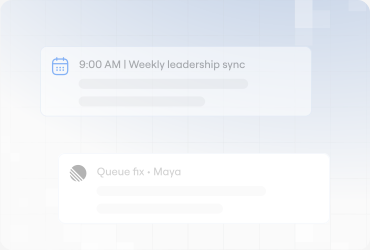
Commitment tracking without micromanaging

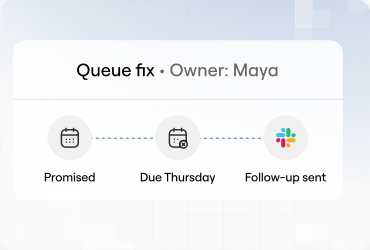
Thor tracks what was promised, by whom, and follows up, so you don't have to ask.
The middle layer you don't have to build

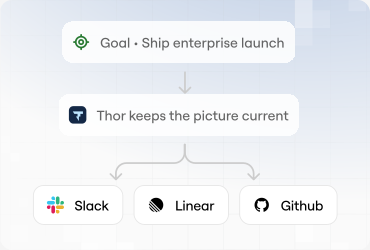
Goals set at the top, work reported automatically from the bottom, feedback loops in between.

You said "ship the queue fix by Thursday" in a meeting. Thursday comes and goes. Thor already knows, and already followed up, before you had to ask.

  1. MeetingCommitment captured
  2. ThursdayDue date passed
  3. ThorFollow-up sent

FAQs

How does Thor protect my data?
Thor is SOC 2 Type II compliant, and we've completed a Cloud Application Security Assessment (CASA), the App Defense Alliance standard for apps that access sensitive Google user data. Thor is a new product from the team behind Zenhub, who have a decade-long track record of building enterprise-grade developer tools with security at their core. We apply the same standards to everything we build.
Do you train your AI models on my company's data?
Absolutely not. Your data is yours alone. We never use customer data, conversations, or meeting transcripts to train our models.
How does Thor handle permissions and data access?
For tools that connect per person (GitHub, Linear, Google, and Notion), Thor uses that person's authorization. If you cannot see a repository or a document, Thor cannot see it through your connection. Slack connects once for the workspace, and Thor's bot only sees channels it has been added to. A system you connect yourself, such as your own MCP server, uses one organization credential set up by the person who configures it. Thor does not sign in to that system as each Slack user, and there is no per-person token in Thor for that connector to rotate.
Does Thor have access to read or write our source code?
No. Thor's integration with tools like GitHub is strictly limited to project management functions like creating, updating, and commenting on issues. It has read access to your codebase in order to understand the context of the work and access the relevant documentation (typically stored in markdown files). Thor cannot push directly to your codebase.
Is there an audit trail for actions taken by Thor?
Yes. The conversation record stores who asked, which tool ran, and what came back. We can provide that record on request. It is not a screen in the product yet. On GitHub and Linear, a write uses the authorization of the person who asked, when they have connected that tool, so the tool's own history shows them. A system you connect yourself is written as the organization credential, so that system's history shows the credential, not the Slack user.
How accurate is Thor with technical conversations?
Thor is specifically tuned for software development and product team conversations. However, our key feature is the "human-in-the-loop" design. Thor always proposes a plan for your approval before taking any action, giving you the chance to add any necessary nuance or corrections.
Will this create more notification spam for my team?
No, the opposite. By centralizing follow-ups and creating structured action plans, Thor reduces the random "just checking in" pings on Slack. You can configure how and when Thor communicates to fit your team's existing workflow and minimize unnecessary noise.
What if I use a tool that isn't on your integrations list?
We are constantly expanding our ecosystem of connected tools based on customer feedback. If you have a specific tool you'd like us to support, we'd love to hear about your use case. Please reach out to our team at support@thor.ai.
Who is Thor built for?
Thor is purpose-built for software engineering and technical teams that are moving too fast and feeling overwhelmed with administrative overhead. It's ideal for team leads, engineering managers, and founders who feel the pain of coordination tax most acutely.
Do I have to invite another bot to all my meetings?
Nope. You have enough bots to deal with. Thor isn't an awkward guest you have to remember to add to every call. It works by hooking into the meeting transcripts your team already generates in Google Meet, Zoom, and Microsoft Teams.
Do I need to be a workspace admin to set up Thor?
Not at all. You can initiate the setup in minutes using standard, secure third-party authorization like GitHub OAuth. If an integration requires broader admin approval, Thor will provide a simple, shareable link for your workspace admin to grant the necessary permissions.
What is the pricing for Thor?
Every plan gets unlimited people, meetings, and connected tools. You only pay for actions, which are the finished things Thor produces: a ticket created, a doc updated, a question answered. Free is $0 with 25 actions a month, Team is $199 with 300, and Enterprise is custom. See thor.ai/pricing for the full breakdown of what counts.